
Mark a conversation read or unread
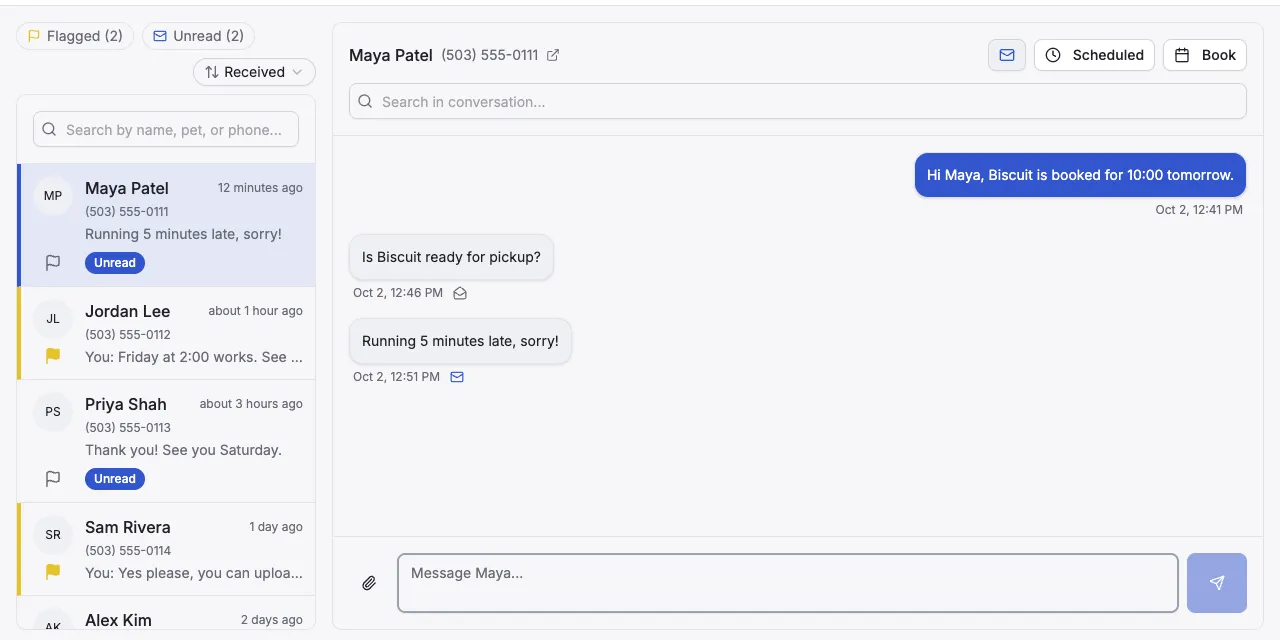
Conversations with replies you haven’t read are labelled Unread in Messaging. Opening a conversation marks it read. You can also mark it unread again, to come back to it later.
How conversations get marked read
Section titled “How conversations get marked read”Open the conversation and stay on it for 2 seconds. It’s then marked read: the Unread label goes away and the counts go down.
If you click a different conversation sooner, it stays unread. Time only counts while Packyard is the browser tab you’re on.
Mark a conversation unread
Section titled “Mark a conversation unread”- Go to Messaging and open the conversation.
- At the top of the conversation, next to Scheduled and Book, click the envelope.
The envelope closes and the conversation shows Unread again. It stays unread while you’re in it. It’s marked read the next time you open it and stay for 2 seconds.
Mark a conversation read without reading it
Section titled “Mark a conversation read without reading it”- Open the conversation.
- If the envelope at the top is closed, click it.
The envelope opens and all its messages are marked read.
- Marking a conversation unread marks the customer’s latest message unread. If the customer hasn’t sent anything yet, the envelope is greyed out.
- You can mark a single message unread with the small envelope next to the time under each customer message.
- The Messaging menu shows how many conversations have unread messages. The Unread button above the list shows how many unread messages there are.
- Everyone on your team shares the same read and unread state. When one person reads a conversation, it’s read for everyone.