
Reschedule or cancel an appointment
Plans change. Moving or cancelling an appointment takes a couple of clicks, and afterwards Packyard asks whether to let the customer know.
Reschedule
Section titled “Reschedule”On a computer or tablet, go to Appointments and use any of these:
- Drag it. Drag the appointment to a new time or to another groomer’s column. On an iPad, press and hold the appointment for a moment before dragging. Times snap to the nearest 15 minutes. Press Esc to drop it back where it was.
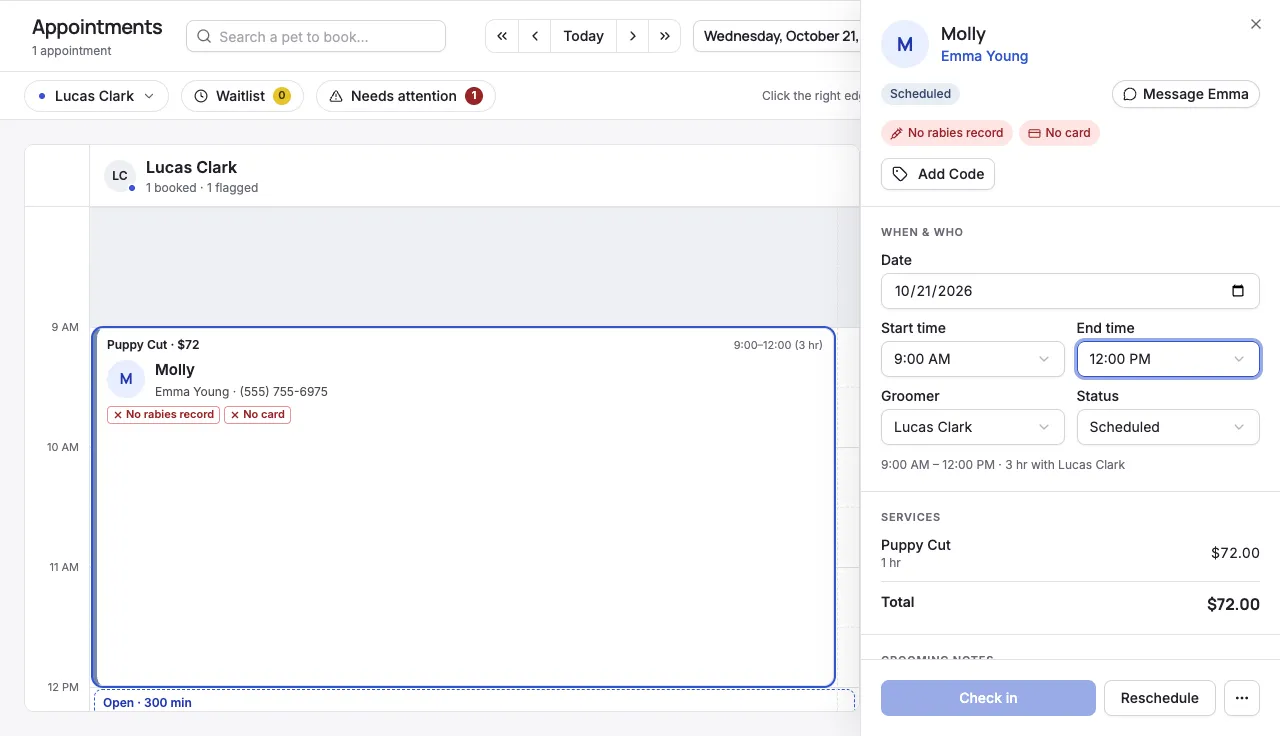
- Pick an open slot. Click the appointment, then click Reschedule. Open gaps show Move [pet] here. Click where in the gap you want it to start. Press Esc or click Cancel to stop.
- Change the details. Click the appointment and change Date, Start time, End time, or Groomer in the panel. Changes save right away. Change the End time to make the visit longer or shorter.
On a phone
Section titled “On a phone”- Go to Appointments and tap the appointment.
- Tap Reschedule.
- Tap an empty time slot. The appointment moves there, with the same services and prices.
Reschedule shows for appointments after today. To move one of today’s appointments on a phone, change its start time and tap Update.
Cancel
Section titled “Cancel”- Go to Appointments and click the appointment.
- Click the ⋯ menu, then Cancel appointment.
- To charge a fee, check Charge Cancellation Fee. Leave it unchecked to cancel without charging.
- Click Confirm Cancellation.
Cancelled appointments stay on the calendar, faded, with a red edge. The customer’s reminders are stopped.
If the booking has several pets, all of them are cancelled. For more on fees, see Handle no-shows and cancellation fees.
Let the customer know
Section titled “Let the customer know”After you move or cancel an appointment, Notify Customer? opens:
- Click Notify to send the customer a text or email about the change.
- Click Skip to send nothing.
Reminders update for the new time either way.
- Only upcoming appointments move. You can drag, reschedule, or cancel an appointment while it’s Scheduled or Confirmed.
- Pet already checked in? The date and start time lock once the pet is checked in. You can still change the groomer.
- To book a cancelled appointment again, click it and click Rebook. This starts a new booking for the same pet.
- Cancelled by mistake? Change the appointment’s Status back to Scheduled. Its reminders are set up again. A fee you charged isn’t refunded automatically.
- Cancel instead of delete. Delete (in the ⋯ menu) removes the appointment and its history for good, and doesn’t tell the customer. Cancelling keeps a record.
- Groomers can only move or cancel their own appointments.