
Agreements & waivers
Waivers signed before the dog walks in.
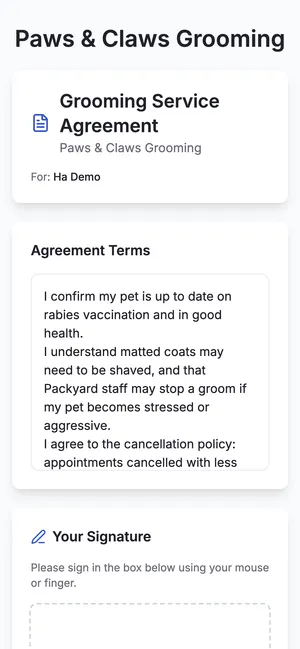
Write your grooming agreement once, send it for e-signature by text or email, and keep the signed copy on the client.
- Included in the $49 plan
- No credit card
- 14 days free
Write it once
Your policies, in your words.
Signed on their phone
Sent by text or email, signed in a minute.
Kept on file
The signed copy and a PDF on the client.
Your agreements
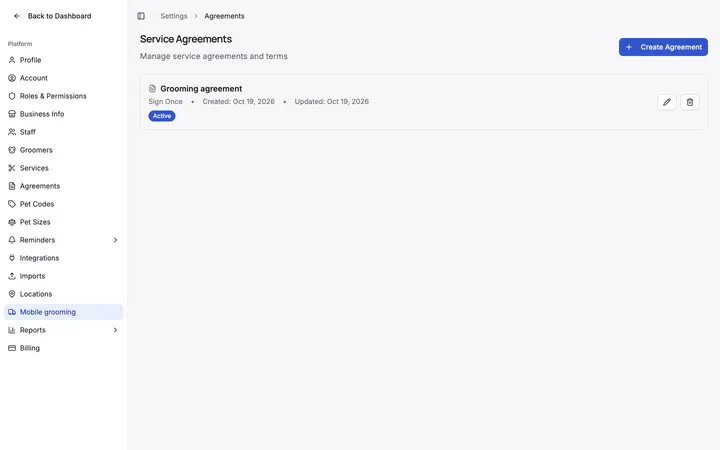
Your policies, ready to send
Create the agreements your salon uses and decide how often clients sign them.
- Create and edit agreements
- Choose how often clients sign
- Set how long a signature stays valid
E-signature
Signed from a text, not a clipboard
Send the agreement by text or email. The client signs on their phone and the signed copy is saved to their profile.
- Sent by text or email
- Signed on the client’s phone
- Signed copy and PDF on the profile
On the day
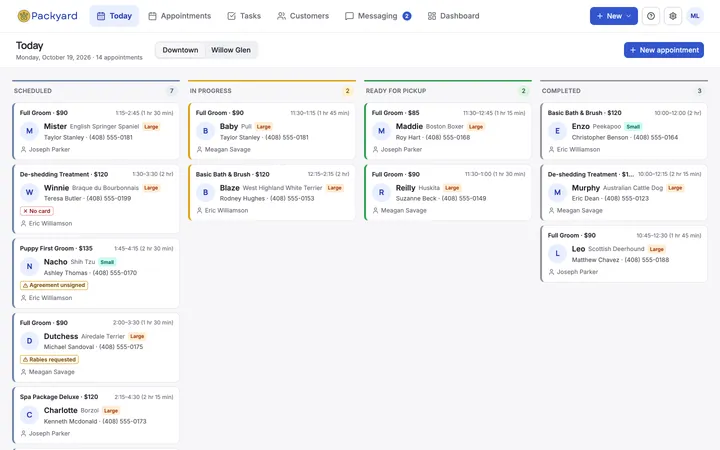
Know who hasn’t signed
Unsigned agreements show on Today’s board and on the client, so nothing slips through at check-in.
- “Agreement unsigned” flag on Today
- Signed status on the client profile
Getting started
Up and running in three steps
- 1
Set up your agreement
Paste in your policies.
- 2
Send it
By text or email, from the client profile.
- 3
Check at the door
Unsigned shows on Today.
Step-by-step guides
Before you ask
Where are signed agreements kept?
On the client’s profile, with a PDF you can open or share.
Can clients re-sign every year?
Yes. Set how long a signature stays valid, and expired agreements are flagged.
Can I have more than one agreement?
Yes. Create as many as your salon uses.
Agreements & waivers is included in every plan. $49 per groomer a month, with every other feature.
See everything includedWorks with
Related features
Try it on your own calendar.
14 days free, no credit card. We import your clients and pets.