
Grooming Apps That Stop No-Shows & Fill Your Chair
Compare top grooming scheduling apps for bookings, reminders, client records, and payments. Find the right fit for your salon.
What Pet Grooming Scheduling Software Does
It’s 9:15am on a Tuesday. Your first appointment never showed—no call, no text. That’s a $75 slot sitting empty, and you turned away another client yesterday to hold it. The real cost isn’t just the missed revenue. It’s the cascade effect on your afternoon, the admin time chasing down what happened, and the frustration that builds when this keeps happening.
Top grooming scheduling apps like MoeGo, Gingr, Pawfinity, and Packyard tackle this problem by replacing paper appointment books and scattered phone calls with a single digital hub. The software handles bookings, sends automated reminders, stores client and pet records, and connects to payment processing—all in one place.
Here’s what the core functions look like in practice:
- Online booking: Clients schedule appointments through your website or a booking link anytime, even at 2am while you’re asleep.
- Automated reminders: The system sends text or email alerts before appointments without you lifting a finger.
- Client and pet records: Digital profiles store grooming history, behavior notes, vaccination records, and photos.
- Calendar management: A visual schedule shows all groomers, appointments, and capacity at a glance.
- Payment processing: Checkout connects directly to the booking system, so totals match and end-of-day reconciliation disappears.
Why Generic Scheduling Apps Fail Grooming Businesses
It’s 2pm on a Saturday. You’ve got a Goldendoodle bath-and-haircut that takes 2.5 hours, but your generic calendar app blocked it as a single 30-minute slot—the same as a nail trim. Now you’re double-booked, running behind, and the afternoon is chaos.
Tools like Google Calendar or general salon software weren’t built for grooming workflows. They can’t handle service stacking, which means scheduling a bath followed by drying time followed by a haircut as one cohesive appointment. They don’t know that a Shih Tzu takes 45 minutes while a Standard Poodle takes three hours. And they can’t limit how many dogs are in your salon at once.
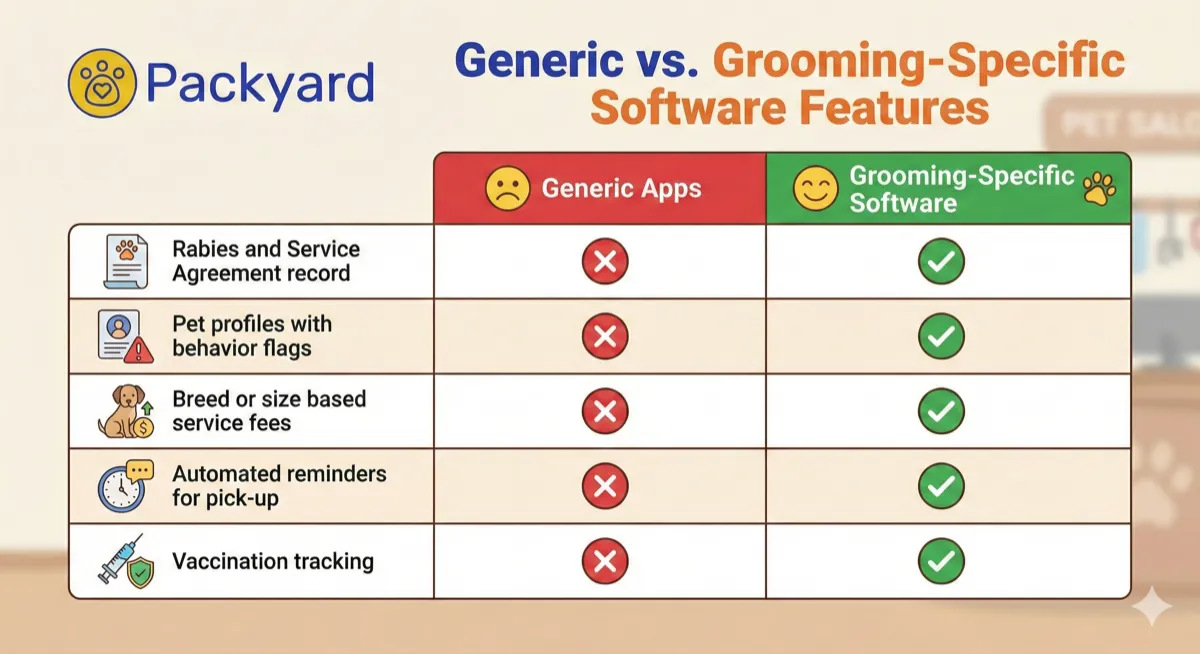
The missing capacity management causes the most damage. Without limits on tables or kennels, the system allows overbooking that creates the kind of afternoon chaos that burns out groomers and frustrates clients.
How Grooming Scheduling Software Stops No-Shows
Most no-shows happen for one simple reason: clients forget. The appointment was booked three weeks ago, life got busy, and Tuesday morning arrived without a reminder. Automated systems solve this by creating multiple touchpoints that keep the appointment top-of-mind, with text reminders proven to reduce no-shows by almost 40%.
Automated SMS Reminders on a Set Cadence
The software sends text reminders at intervals you choose—typically 24 hours and 2 hours before the appointment. This happens automatically for every booking, every time. No manual texting, no forgetting to remind that new client.
A single reminder catches some forgetters. A multi-touch sequence catches more, with two-way SMS reminders reducing no-shows 23% more than one-way messages. The cadence might look like this: confirmation at booking, 48-hour heads-up, 24-hour reminder, and a day-of alert. Each touchpoint reduces the chance someone simply forgets.
Confirmation Tracking That Shows Who Actually Replied
You can see a clear status for every appointment: confirmed, unconfirmed, or canceled. Instead of wondering who’s actually coming, you know exactly who acknowledged their appointment and who hasn’t responded.
Unconfirmed appointments become actionable. You can follow up with a quick call or open the slot for your waitlist before it’s too late to fill. The visibility changes how you manage your day.
No-Show Flags That Spot Repeat Offenders
Good software automatically flags clients with a history of missed appointments. After two or three no-shows, the system marks them as high-risk. You can then require deposits for their future bookings or adjust your policies—without having to remember who ghosted you six months ago. The policy side of this is worth settling first: how to charge grooming deposits without losing clients covers who should pay one and how much.
Try it with your numbers
What are no-shows costing you?
Drag two sliders. Packyard's calculator uses your groom price and your no-show count, not an industry average.
What to Look for in Dog Grooming Booking Software
Not all grooming software works the same way. Here’s what separates purpose-built tools from generic schedulers.
24/7 Online Booking With Protective Rules
Online booking lets clients self-schedule while you’re grooming, sleeping, or enjoying your weekend. The key is rule-based booking—you control lead time for new appointments, service durations, and staff availability. Clients only see slots that actually work for your salon.
Grooming-Specific Calendar for Baths, Haircuts, and Buffers
A proper grooming calendar handles stacked services. You can schedule a bath, dry, haircut, and nail trim as one appointment block with built-in buffer time for cleanup between clients. No more doing time math in your head.
Client and Pet Profile Management
Centralized records store pet names, breeds, behavior flags like “anxious” or “bites during nail trims,” allergies, groom history, and before-and-after photos. Anyone on your team can pick up where the last groomer left off.
Two-Way Texting in a Shared Inbox
Texting from a dedicated business number keeps communication professional and accessible. A shared inbox means any team member can see and respond to client messages. When staff leaves, the conversation history stays with the business.
Native Payment Integration
The best software connects directly to payment processors like Square. Checkout becomes seamless, appointment totals match payment totals automatically, and end-of-day reconciliation disappears. Packyard’s native Square integration, for example, syncs services, retail, tips, and taxes without manual data entry.
Daily Reports and Rebooking Insights
Look for reporting that tracks daily revenue, rebooking rates, top-spending clients, and staff performance. The numbers help you spot trends and make decisions about scheduling, pricing, and staffing.
Online Booking That Fills Your Schedule Without Creating Chaos
Many groomers worry that opening up online booking will create an unmanageable mess. What if clients book back-to-back Goldendoodles? What if they schedule outside your hours? Modern grooming software prevents this with rule-based systems.
Setting Service Times and Staff Availability
You define which services each groomer offers and their working hours. Clients only see appointment options that fit within the rules you set. A junior bather won’t accidentally get booked for a complex hand-strip.
Capacity Limits That Prevent Double-Booking
You can set limits for grooming tables, kennels, or total dogs in the salon. The system automatically stops overbooking—even if multiple clients try to book the same time slot at once.
What Clients See vs. What You Control
The client-facing booking page stays simple: pick a service, pick a time, confirm. Behind the scenes, you control all the complex rules. The schedule works for your salon, not against it.
Grooming Calendar Built for Real Salon Workflows
A grooming-specific calendar looks different from a generic appointment view. It mirrors how your day actually runs.
Stacking Services and Scheduling Cleanup Time
You can stack multiple services into a single appointment block and add buffer time for prep, drying, and station cleanup. A 2-hour Doodle groom might include 30 minutes of bath, 45 minutes of drying, 45 minutes of scissor work, and a 15-minute buffer before the next dog.
Multi-Groomer and Multi-Table Visibility
The calendar shows every groomer’s schedule side-by-side. You can see who’s working on what, which tables are in use, and where gaps exist. Managing physical space becomes visual instead of mental.
Seeing Every Pet at a Glance
A well-designed calendar gives you an at-a-glance overview of every pet in your salon—who’s being worked on, who’s waiting for pickup, who’s next. This improves workflow and makes handoffs between staff smoother.
It also lets you control when dogs arrive rather than taking everyone at 8am. Staggered drop-offs are how you stop the last dog of the morning sitting in a kennel for four hours.
Client and Pet Profiles in One Place
Centralized record-keeping is the backbone of consistent service. When every detail lives in one place, any staff member can deliver the same quality groom.
History, Notes, Photos, and Behavior Flags
Complete profiles include groom history, internal notes like “matted last time” or “prefers lavender shampoo,” before-and-after photos, and clear behavior warnings. The next groomer doesn’t start from scratch.
Medication Allergies and Vaccination Tracking
For safety and compliance, track medication allergies, health conditions, and vaccination expiration dates. Some systems alert you when a pet’s rabies vaccine is about to expire—before the appointment, not during check-in.
Handoffs That Work When Staff Changes
When a groomer calls in sick or leaves the company, complete digital profiles ensure smooth handoffs. A substitute groomer can review the pet’s entire history and deliver consistent service without asking the client repetitive questions.
Built-in Texting That Stays Off Personal Phones
Staff using personal phones to text clients creates problems. Messages get lost, professionalism suffers, and when someone leaves, they take the conversation history with them.
A shared inbox tied to a business number solves this:
- All messages in one place: Every text is tied to the appointment and client record.
- Team visibility: Any authorized staff member can see and respond.
- Professional number: Clients text your business, not a personal cell.
- Message history retained: Conversations stay with the business, not the employee.
Square Integration for Grooming Businesses
For groomers already using Square, native integration means adopting powerful scheduling tools without switching payment processors.
Syncing Services, Retail, Tips, and Taxes
A true integration automatically syncs your services, retail products, tips, and tax calculations between the scheduling software and Square. Add a service in your scheduler, and it appears correctly at checkout.
End-of-Day Totals That Match Without Manual Work
With integrated systems, your scheduling software totals match your Square reports. No more spending 30 minutes reconciling two separate systems at closing time. Over a week, that’s 2.5 hours saved. Over a year, more than 100 hours.
Mobile Grooming Software vs. Salon Scheduling Apps
Mobile groomers and brick-and-mortar salons have different needs. Choosing software that matches your business model matters.
Scheduling for Mobile Grooming Routes
Mobile groomers benefit from route planning and optimization to minimize drive time. The software calculates travel time between appointments and blocks it off automatically.
In-Shop Salon and Multi-Table Operations
Salons benefit from tools for managing multiple tables, stations, and groomers on a single schedule. Capacity management prevents overbooking physical space.
Daycare, Boarding, and Retail in One System
For businesses offering more than grooming, an all-in-one system handles grooming, daycare check-ins, boarding stays, and retail sales without juggling multiple tools.
How Much Dog Grooming Software Costs
Pricing varies across providers, but understanding the common models helps you evaluate options.
Per-Groomer Pricing vs. Flat Monthly Fees
Some software charges per groomer—your cost scales as your team grows. Others offer flat monthly fees regardless of staff size. Packyard, for example, charges $49/month per groomer.
Free Trials and Money-Back Guarantees
Reputable providers offer risk-free trials. Look for free trials without credit card requirements or money-back guarantees. Testing with your actual workflow is the only way to know if the software fits.
Tip: Do the math on ROI. If your average appointment is $75 and the software prevents even one no-show per month, it pays for itself.
How to Choose the Right Grooming Appointment App
Here’s a process for selecting the right software:
1. List Your Must-Have Features
Write down your non-negotiables. Mobile route planning? Daycare check-ins? Square integration? This list becomes your filter.
2. Check Payment Processor Compatibility
If you already use Square, confirm the software integrates natively. Avoiding a processor switch saves significant hassle.
3. Test the Calendar With Your Actual Workflow
During your trial, enter real services, staff schedules, and a sample week of appointments. See if the calendar handles your actual day-to-day.
4. Run a Free Trial Before Committing
Use the full trial period. Book test appointments, send test reminders to your own phone, check out a client. Experience the entire workflow.
Evaluation checklist:
- Supports my business type (salon, mobile, daycare)
- Stacks services with buffer time
- Integrates with my payment processor
- Includes automated reminders
- Stores pet profiles with notes and photos
- Offers two-way texting from a shared inbox
- Provides a free trial
Keep Your Chair Full and Stop Losing Money to Empty Slots
The right grooming scheduling app transforms a chaotic appointment book into a system that protects your time and revenue. Automated reminders keep clients showing up. Confirmation tracking tells you who’s actually coming. Native payment integration means checkout doesn’t feel like a separate job.
Packyard is built specifically for grooming workflows—with a calendar that handles stacked services, deep Square integration, and automated reminders that keep chairs full.
FAQs About Grooming Scheduling Apps
What is the best booking app for dog groomers?
The best app depends on your business type and existing payment setup. Mobile groomers prioritize route optimization while salons prioritize multi-table management. Look for grooming-specific features rather than generic scheduling tools.
Can grooming software work with an existing Square account?
Yes—some grooming software offers native Square integration, allowing you to keep your current payment setup while adding scheduling, reminders, and client management.
How do groomers switch scheduling systems without losing client data?
Most providers allow data imports from spreadsheets or other systems. Check if the new software offers migration assistance to make the transition smooth. If your records are still handwritten, moving from a paper book to online booking walks through the migration a weekend at a time.
Does pet grooming software work on phones and tablets?
Most modern grooming software is cloud-based and works on any device with an internet browser—phones, tablets, and desktops.
How long does it take to set up a new grooming scheduling app?
Basic setup—adding services, staff, and hours—typically takes a few hours. Full migration with client data import may take a few days.
Ran two grooming salons and a pet store, got fed up with software built for hair salons, and built Packyard with a team of groomers. Still on the floor most Saturdays. Writes about the parts of grooming nobody taught you.