· Packyard Team · How-Tos · 14 min read
5 Systems to Close Your Salon 30 Minutes Faster
Cut 30+ minutes from your daily checkout routine with these 5 proven systems. Includes payment integration, rebooking workflow, and digital agreements.
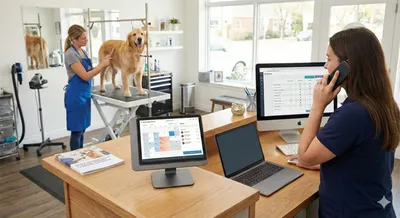
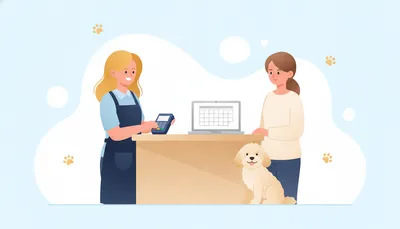
It’s 6:15 PM. Three clients are lined up waiting to check out. One’s asking about the charges for de-matting you mentioned earlier. Another needs to rebook but “has to check their calendar first.” The client at the counter can’t remember their Square PIN while their freshly groomed golden retriever is pulling toward the door. Your iPad’s payment reader disconnects mid-transaction. Again.
Meanwhile, tomorrow’s 8 AM appointment just texted asking if you can take them earlier, your phone’s dinging with three more messages, and you still need to sanitize equipment and sweep hair before you can even think about leaving.
This isn’t just a frustrating end to your day—it’s costing you real money.
Most groomers lose 30-45 minutes every evening to checkout chaos. That’s time you could spend prepping for tomorrow, following up on rebookings, or actually getting home before dark. More importantly, rushed checkouts mean missed rebooking opportunities, forgotten upsells, and clients who leave without scheduling their next appointment.
After working with hundreds of grooming businesses—backed by our team’s 40+ years of combined industry experience—we’ve identified five specific operational systems that can cut your checkout time by half while actually increasing your rebooking rate and improving client satisfaction.
These aren’t quick tips. They’re integrated systems that address the root causes of checkout bottlenecks. Let’s break down exactly why your current process is broken and how to fix it.
Why Your Current Checkout Process Is Broken (And It’s Not Your Fault)
The typical grooming salon checkout involves juggling multiple disconnected tools:
- Square terminal for payments
- Paper service agreements (or trying to remember if they signed one)
- Physical appointment book or separate calendar app
- Calculator for adding up services and tips
- Phone for rebooking
- Handwritten notes about the appointment
- Business cards with next appointments scribbled on them
This “app juggling” creates massive cognitive load. You’re trying to remember what happened during the groom (Was the coat matted? Did the dog do well? Did you recommend that conditioning treatment?) while simultaneously processing payment, handling rebooking, and managing the next client in line.
The real cost? Here’s what we see in traditional checkout processes:
The Time Tax: Average checkout time runs 8-12 minutes per client. With 5-8 clients daily, that’s 40-90 minutes of your evening consumed by checkout alone.
The Revenue Leak: When you’re rushed or distracted, rebooking falls through the cracks. If just two clients per day leave without rebooking at your $75 average ticket, that’s $3,900 per month in revenue that requires follow-up calls, texts, and often discounts to recover.
The Bottleneck Effect: One slow checkout backs up everyone else. The pressure mounts, conversations get rushed, details get missed, and client experience suffers.
Let’s fix this with systems, not willpower.
System #1: Digital Service Agreements That Actually Work
The Problem: Paper service agreements create checkout friction. Clients “forgot to bring it,” you can’t find their copy, handwriting is illegible, or they want to “read it first” while three other people wait.
The System: Digital service agreements signed before clients arrive.
Here’s how it works:
- Automated Delivery: When clients book, they automatically receive a digital service agreement 48 hours before their appointment
- Mobile Signing: Clients sign on their phone in under 60 seconds using simple e-signature
- Service-Specific Templates: Different agreements for standard grooms, difficult coats, senior dogs, or behavioral issues
- No Paperwork at Checkout: Agreement is already signed, stored, and searchable
- Automatic Copies: Client gets a copy via email; you have an instantly searchable record
Packyard Advantage: Built-in digital service agreements that are embedded in your booking flow. Unlike competitors that require separate DocuSign integrations, ours work natively with your scheduling and client records.
Implementation Checklist
- Create 2-3 agreement templates (standard groom, difficult coat, senior dog)
- Set up automatic delivery 48 hours before new client appointments
- Add conditional clauses based on service type (de-matting fees, behavioral policies)
- Configure “unsigned agreement” flags in your daily appointment view
- Train staff to check agreement status before starting grooms
Common Bottleneck: Clients who say “I’ll sign when I get there.”
Solution: Send a friendly text 24 hours before: “Hi! Quick reminder—we need your service agreement signed before tomorrow’s appointment so we can get [pet name] started on time. It takes 30 seconds: [link]”
Make it about their convenience, not your policy.
System #2: Native Payment Integration (The Square Advantage)
The Problem: Disconnected payment systems turn simple transactions into multi-step ordeals. You’re switching between apps, manually entering amounts, handling payment method changes, and dealing with connection issues at the worst times.
The System: Native payment integration where your scheduling, client records, and payment processing work as one system.
Here’s the difference:
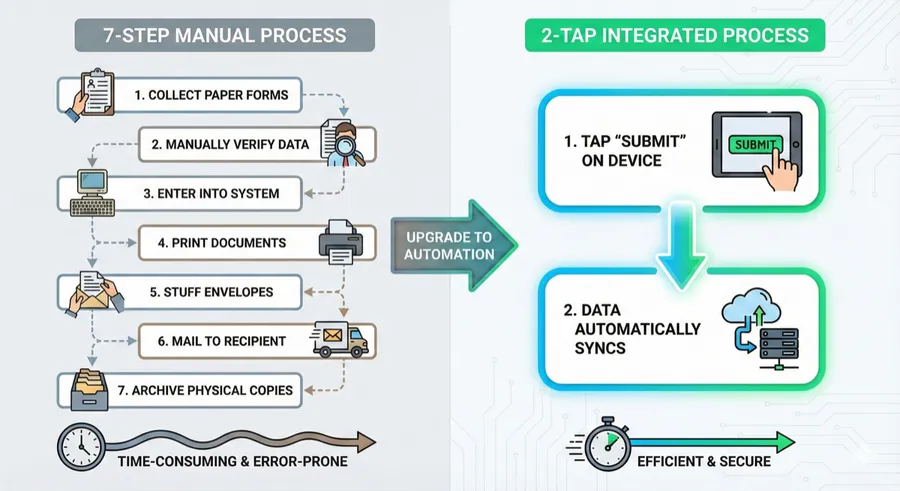
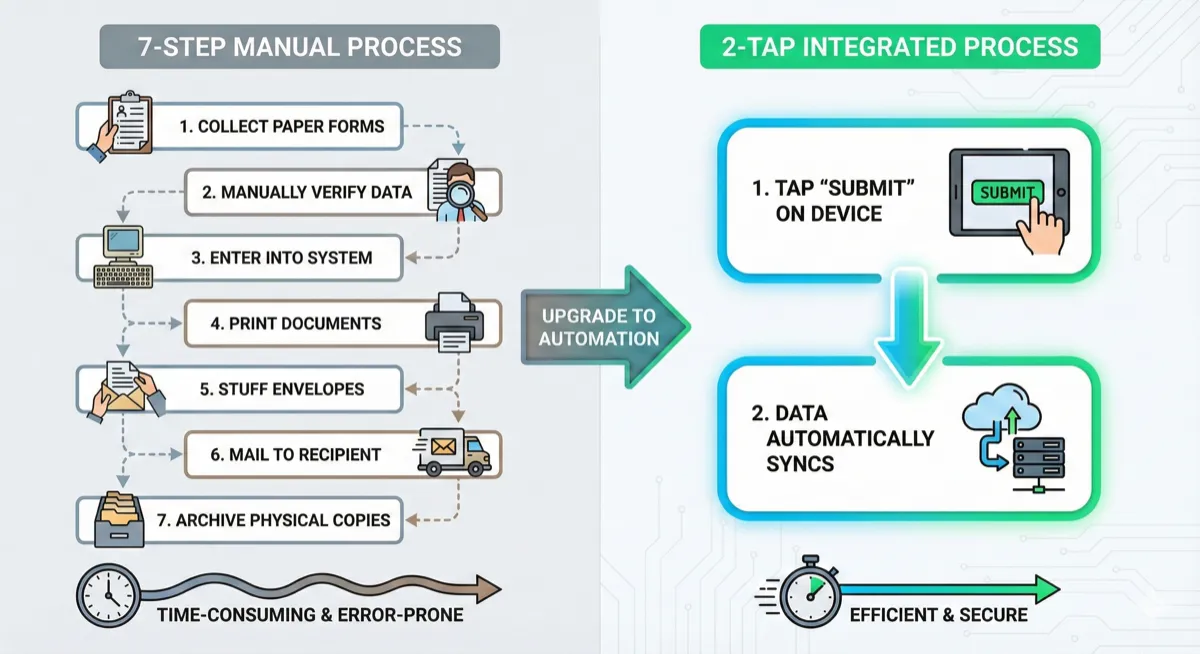
Manual Payment Process (7 Steps, 4+ Minutes)
- Calculate total services from notes or memory
- Open Square app separately
- Manually enter amount
- Process payment (wait for reader connection)
- Handle tip separately (awkward conversation)
- Write receipt or email it manually
- Record payment in separate scheduling system
Integrated Payment Process (2 Taps, Under 60 Seconds)
- Tap “Checkout” button—services and charges pre-loaded from appointment
- Client taps their saved payment method or card—done
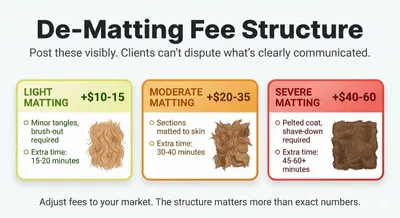
This speed matters beyond convenience—faster checkout means more time for the rebooking conversation that prevents no-shows, and smooth fee collection for add-ons like matting fees you can’t afford to absorb.
Key Features of Native Integration:
- Saved Payment Methods: Card on file means no fumbling with wallets, expired cards, or Apple Pay connection issues
- Pre-Authorized Charges: For standing appointments, you can even process payment automatically with client authorization
- Intelligent Tip Handling: Built-in tip prompts (15%, 18%, 20%) make it easy for clients to tip appropriately without awkwardness
- Digital Receipts: Automatically include service notes, next appointment, and a rebooking link
- Real-Time Sync: Payment instantly appears in your daily sales without manual reconciliation
Packyard Differentiator: We maintain native Square integration, which means updates happen automatically and connection issues are virtually eliminated. Some competitors like MoeGo lost their native Square integration, forcing users to third-party workarounds that break regularly.
Implementation Checklist
- Set up card-on-file collection during first visit or booking
- Create service packages with fixed pricing to eliminate calculation
- Configure automatic tip prompts at your preferred percentages
- Enable contactless payment options (tap-to-pay, digital wallets)
- Set up automatic receipt delivery with rebooking link included
The Cost of Payment Friction:
- Entry Errors: Manual payment entry produces errors in 2-3% of transactions (either undercharging or overcharging)
- Reconciliation Time: Groomers report 1-2 hours monthly reconciling payments across systems
- Missed Charges: How many times have you eaten a $15 add-on service rather than chase down payment later?
- Client Frustration: Payment problems are the #1 source of checkout complaints
System #3: Checkout-Time Rebooking Workflow
The Problem: Trying to rebook after processing payment means clients are already mentally “checked out.” They’re gathering their dog, their stuff, and thinking about their next errand. The window has closed.
The System: Built-in rebooking as part of checkout, not after.
The data is clear: Clients are 3-4x more likely to rebook when asked before they leave versus follow-up calls or texts later. Standing appointments also have 60-70% lower no-show rates than on-demand bookings—preventing the $15K+ annual losses most groomers experience.
Here’s how the system works:
The Integrated Rebooking Flow
- Pre-Populated Suggestions: System automatically suggests next appointment date based on breed and service interval (6 weeks for doodles, 8 weeks for short coats, etc.)
- Calendar-While-You-Wait: While processing payment, your calendar is visible showing available slots
- Two-Option Close: “I have Thursday the 15th at 10 AM or 2 PM—which works better?”
- Immediate Confirmation: Selected appointment sends automatic SMS with add-to-calendar link
- Follow-Up Flagging: Clients who decline rebooking get flagged for next-day follow-up
The Script That Works:
“Let me get [pet name] on the schedule while you’re here—looks like 6 weeks puts us at [specific date]. I have 10 AM or 2 PM available that Thursday. Which is better for you?”
Notice what this does:
- Assumes rebooking (not asking if they want to)
- Provides specific date (removes decision fatigue)
- Offers two concrete options (easy choice)
- Happens while they’re engaged, not distracted
Implementation Checklist
- Create breed-based default intervals in your system
- Configure calendar view to appear during checkout screen
- Set up SMS confirmation with calendar file attachment
- Create automatic next-day follow-up task for declined rebookings
- Track rebooking rate by staff member (if multi-groomer salon)
Supporting Data:
- At-Checkout Rebooking: 65-75% success rate
- Next-Day Follow-Up: 30-40% success rate
- Week-Later Follow-Up: 15-20% success rate
The difference between 65% and 20% rebooking rate on a $75 average ticket across 25 clients weekly is $2,925 monthly in revenue that’s either automatic or requires significant recovery effort.
Standing appointments also transform your business model from reactive (hoping clients call) to proactive (predictable revenue pipeline).
System #4: Service Notes That Feed Your Checkout
The Problem: Trying to remember what happened during the groom three hours ago while you’re processing payment leads to forgotten details, missed upsells, and generic client communication.
The System: Document observations during the groom so they automatically appear during checkout.
This solves multiple problems simultaneously:
Real-Time Documentation
Instead of trying to remember details at day’s end:
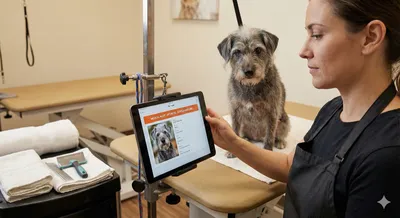
- Voice Notes: Use voice-to-text to capture observations while working (“Coat more matted than last visit, spent extra 15 minutes on legs”)
- Quick-Select Options: Tap common observations (anxious, did well, nails long, ears dirty)
- Photo Documentation: Take before/after shots that timestamp and attach to client record
- Behavior Flags: Mark issues that need to show up on next appointment
Checkout Integration
When you open checkout for that client:
- Service notes automatically appear in summary
- Relevant upsell suggestions based on observations
- Details include in digital receipt
- Notes inform rebooking conversation
Example Checkout Conversation:
“Bella did great today! Her coat was more matted than last time though—I spent about 15 minutes extra working through tangles on her legs and chest. For next time, I’d recommend brushing her out twice a week, and we could add a conditioning treatment to help prevent matting. Want me to include that for your appointment in 6 weeks?”
This conversation references specific details, provides value, and creates a natural upsell opportunity—all because you documented during the groom instead of trying to remember later.
Implementation Checklist
- Create quick-select note templates for common observations
- Set up voice-to-text for detailed notes while working
- Configure note prompts to appear during checkout
- Create searchable tags for common issues (matted, anxious, elderly, sensitive skin)
- Set up automatic note inclusion in client receipt email
Packyard Feature: Our pet record system surfaces relevant history during checkout, including previous service notes, behavioral observations, and vaccination records. Everything you need to reference is in one screen. Learn more about how top groomers track pet behavior notes that actually get used.
Common Bottleneck: “I’ll remember and write it down later.”
No, you won’t. Or you’ll remember some things and forget others. Document in the moment, benefit at checkout.
System #5: The “Tomorrow Prep” Protocol
The Problem: You’re so exhausted from today’s checkout chaos that you start tomorrow unprepared, which creates new chaos.
The System: Spend your last 10 minutes reviewing tomorrow, not recovering from today.
This is the system that makes every other system work better.
The End-of-Day Routine (10 Minutes)
Before you clean up, do this:
- Tomorrow’s Appointment Review: Pull up next day’s schedule with full client history
- Flag Potential Issues: Note anxious dogs (schedule first), back-to-back large breeds (needs pacing), coat condition concerns
- Equipment Prep: Pull any special brushes, shampoos, or tools needed for specific breeds
- New Client Prep: Review intake forms and service agreements already signed
- Expiring Vaccines: Check for any vaccination records expiring within 30 days
- Morning Reminders: Confirm automatic SMS reminders are scheduled for 7 PM
The Math:
- 10 minutes prep = 5 minutes saved per appointment next day
- With 5 appointments = 25 minutes saved
- Fewer surprises = less stress = better quality work
Tomorrow-Morning You will thank Today-Evening You.
Implementation Checklist
- Create end-of-day review routine (before cleanup)
- Set up next-day appointment preview with full client/pet history
- Configure automatic morning reminders to send at 7 PM
- Create new client intake review process
- Set up vaccination expiration alerts at 30 days
This protocol transforms you from reactive (dealing with surprises) to proactive (anticipating needs).
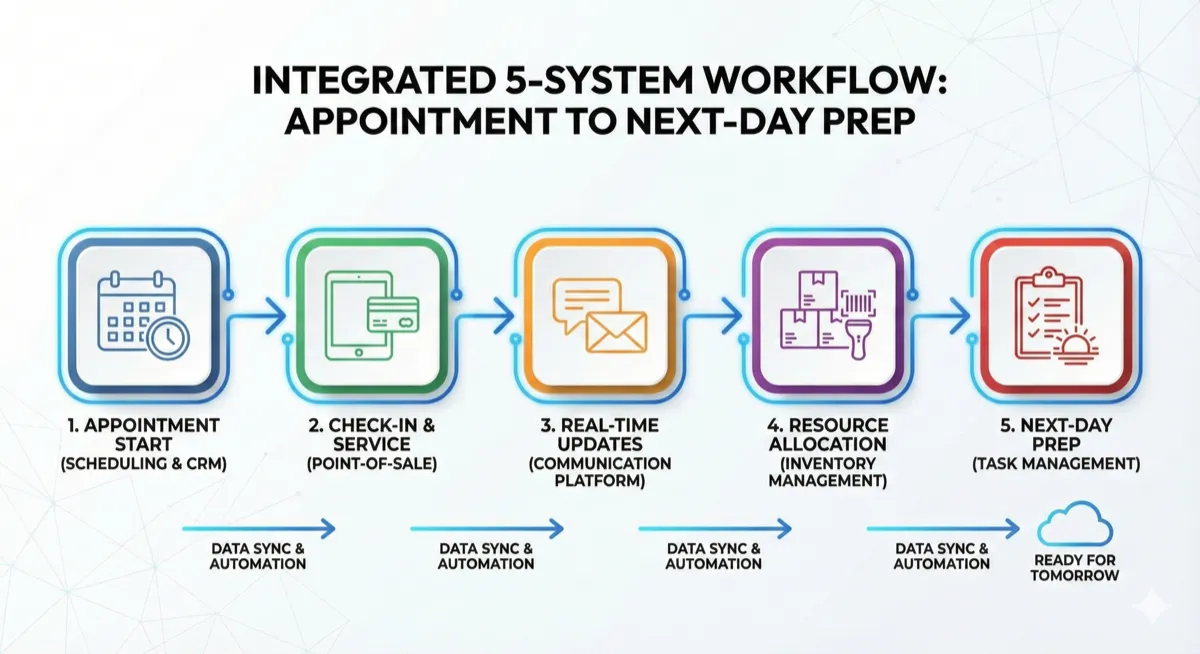
Putting It All Together: The Integrated Checkout Flow
Let’s see how all five systems work together in practice.
The Old Way (12+ Minutes)
Client arrives for pickup:
- Search for their paperwork (1 min)
- Try to remember what happened during groom (1 min)
- Calculate services manually, hope you didn’t forget anything (2 min)
- Open Square app, manually enter amount (1 min)
- Process payment, deal with connection issue (2 min)
- Handle tip calculation awkwardly (1 min)
- Ask if they want to rebook, they need to “check their calendar” (2 min)
- Write next appointment on business card (1 min)
- Handwrite receipt or manually email one (1 min)
Total: 12 minutes, client leaves without confirmed rebooking, you have no record of what you discussed, and you forgot to mention the conditioning treatment you wanted to recommend.
The New Way (3-4 Minutes)
Client arrives for pickup:
- Pet record already open with today’s service notes from during the groom
- Review notes naturally: “Bella did great today, but her coat was more matted than last time—I spent extra time working through tangles on her legs.”
- Tap checkout button: Service charges pre-loaded, saved payment method shown
- Integrated rebooking: “Let’s get you scheduled for 6 weeks—I have Thursday the 15th at 10 AM or Friday the 16th at 2 PM?”
- Client selects appointment, taps their saved card
- Done: Digital receipt sent automatically with appointment details and add-to-calendar link
Total: 3-4 minutes, client is rebooked with confirmed appointment, detailed receipt includes service notes and recommendations, tomorrow’s prep is already done.
The Benefits Stack
- 30+ minutes saved daily = 2.5 hours/week = 130 hours/year
- Higher rebooking rate (65% vs 20%) = more predictable revenue
- Better client experience = more referrals and reviews
- Reduced stress = sustainable career you actually enjoy
- Professional appearance = command premium pricing
This isn’t about working harder. It’s about removing friction through better systems.
Troubleshooting Common Checkout Bottlenecks
Even with systems in place, you’ll hit occasional bottlenecks. Here’s how to handle them:
Bottleneck #1: “I need to check my calendar”
Old Response: “Okay, just call me when you know.” (They forget, you follow up multiple times, they finally rebook 3 weeks late)
System Response: “No problem! I’ll hold Thursday at 10 AM and Friday at 2 PM for you. I’ll send you a text in an hour—just reply with which one works and you’re all set.”
Then create automatic follow-up task and send text: “Hi [name]! Holding these times for Bella’s next groom: Thu 4/15 at 10 AM or Fri 4/16 at 2 PM. Reply 1 for Thursday or 2 for Friday and you’re booked!”
This is frictionless rebooking without letting them leave uncommitted.
Bottleneck #2: Payment disputes from previous visits
Old Response: Dig through paper receipts, reconstruct conversation, offer discount to avoid conflict.
System Response: Pull up digital receipt with itemized services, timestamps, service notes, and photos.
“Here’s your receipt from that visit—you can see we did the full groom plus de-matting on the legs and ears which added $20. Here’s the before photo showing the matting, and you signed the service agreement authorizing additional fees for de-matting. Your receipt was emailed right after checkout.”
Digital records eliminate disputes before they start.
Bottleneck #3: Complicated service calculations
Old Response: Pull out calculator, add up services, add products, calculate tip manually, probably make a math error.
System Response: Create service packages with fixed pricing:
- Standard Groom: $75 (includes bath, haircut, nails, ears, glands)
- Full Spa: $95 (Standard + teeth brushing, conditioning, cologne)
- Puppy Package: $50 (intro pricing, bath and trim only)
Add-ons are separate line items in system. Checkout auto-calculates. No math required.
Bottleneck #4: Multiple clients waiting to check out
Old Response: Rush through each one, miss rebookings and upsells, frustrated clients.
System Response: Mobile checkout capability. Meet clients at their car if needed, or have an assistant start pre-checkout (getting card ready, reviewing notes) while you finish with previous client.
With integrated systems, checkout can happen anywhere, not just at the register.
Bottleneck #5: Vaccination record verification
Old Response: “Did you bring updated records?” Usually they didn’t.
System Response: Automated expiration tracking sends client notification 30 days before expiration: “Bella’s rabies vaccine expires in 4 weeks. Please email updated records to [email] before her next appointment on [date].”
Follow-up reminder at 2 weeks. Final reminder at booking confirmation.
This prevents checkout delays from missing documentation.
Your 30-Day Checkout Optimization Plan
Don’t try to implement everything at once. Here’s a realistic rollout:
Week 1: Audit and Baseline
- Time your actual checkout process for one week
- Track how many clients leave without rebooking
- Note which specific steps take longest
- Calculate your current checkout time average
Week 2: Implement Digital Service Agreements
- Create your agreement templates
- Set up automatic delivery 48 hours before appointments
- Test with 5 new clients
- Refine based on feedback
Week 3: Integrate Payment System
- Set up service packages with fixed pricing
- Configure saved payment methods
- Test integrated checkout flow
- Train any staff on new process
Week 4: Add Rebooking Workflow and Service Notes
- Create breed-based rebooking intervals
- Set up calendar view during checkout
- Create quick-select service note options
- Practice the rebooking script
Week 5: Establish Tomorrow Prep Protocol
- Create end-of-day review routine
- Set up next-day appointment preview
- Configure automatic morning reminders
- Track time savings
Week 6: Measure Results
- Compare checkout time to baseline
- Check rebooking rate improvement
- Calculate time saved over 30 days
- Identify remaining bottlenecks to address
Expected Results After 30 Days:
- Checkout time reduced from 10-12 minutes to 3-4 minutes per client
- Rebooking rate increased from 20-30% to 60-70%
- 20-30 hours saved monthly
- Significantly reduced end-of-day stress
Take the Next Step
Checkout chaos isn’t inevitable—it’s a systems failure you can fix. See how integrated payment and scheduling systems eliminate the app-juggling and manual entry that create checkout bottlenecks, or explore complete salon management software built specifically for busy grooming operations.
Start your free trial today and experience checkout that takes 3 minutes instead of 12.